Daylum for iOS and Android
A goal tracker built into your journal
Goals in Daylum are journaling goals: each one counts the entries you log toward a target, on a daily, weekly, or monthly rhythm. They are free, uncapped, and worked out on your device.
The shape of a goal
Daily, weekly, or monthly, and nothing else
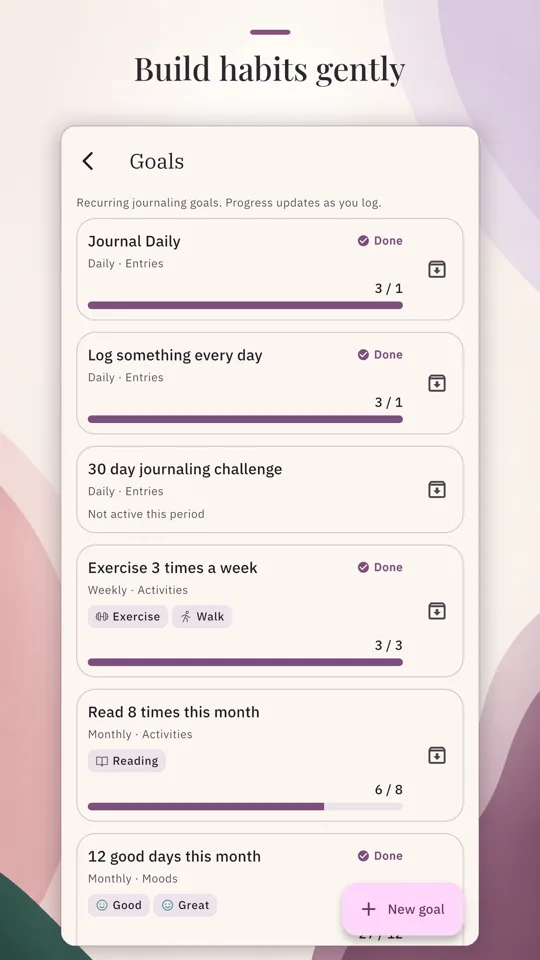
A goal in Daylum is a recurring journaling goal. Progress updates as you log, and the window resets with the cadence you chose.
Goals
Every goal has a cadence: daily, weekly, or monthly. The cadence sets the window it counts in, today, this week, or this month, and a weekly goal follows the day your week starts. When the window turns, the count resets and the goal begins again. Goals are uncapped and free, so you can keep one running or a dozen.
Targets
What a goal counts
Each goal counts qualifying journal entries toward a target you set, and there are three ways an entry qualifies.
Entries
Counts every entry you log in the window. The plainest goal there is: journal three times this week, whatever the entries hold.
Activities
Counts entries that include one of the activities you pick. Tag your runs with an Exercise activity, and a goal can watch for three of them a week.
Moods
Counts entries whose mood is one you pick, so a goal can watch how often a Good or Great entry shows up in a month.
A target is a count of entries, not a checklist and not a measurement. A goal cannot mark a task done or record a number for you; what it does is watch your journal for the entries you told it to count.
Progress
Progress fills in as you log
Each goal shows its count against its target for the current window, reads Done when the target is met, and starts over when the window turns. Progress is worked out live from your entries. Logging is the only input, and there is nothing separate to tick.
Goal cards sit on the Stats screen and in a glance section on Home. A goal has a start date and can take an end date, and a goal you are finished with can be archived: it leaves the active list with its history intact.
The Stats screen also keeps streaks: your current run of consecutive days with at least one entry, and your best run ever. The rest of the statistics surface is covered on the mood tracking page.
Getting started
Quick starts, and a nudge when you want one
The Goals screen opens with three quick starts: Journal every day, Journal 3 times a week, and Reflect 10 times a month. Each is a goal you create in one tap and can edit later, or you can build your own from the same form: a name, a cadence, what to count, and how many.
Any goal can carry a reminder. You pick the time, and the repeat follows the cadence: every day for a daily goal, once a week when the week starts, once a month on the first. Reminders are local notifications scheduled on your device, and no reminder data ever leaves it.