Daylum for iOS and Android
Mood tracking that stays on your phone
Daylum tracks your mood the way a journal does: you log an entry, and the calendar, Year in Pixels, and every statistics screen are worked out from your entries on your device.
Logging
Log a mood in seconds
New Entry
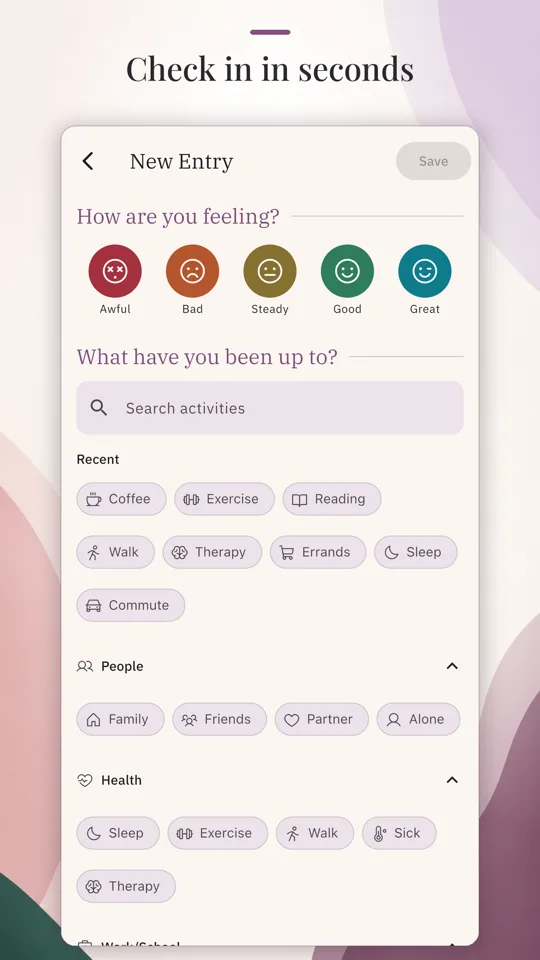
Every mood you track starts as an entry: a mood, the activities that fit, and a note or a photo if you want one. The scale runs Awful, Bad, Steady, Good, and Great, and you can rename or recolor any step and add moods and activities of your own, with no cap on either. Log as many entries a day as you like. Each carries its own time, so a rough morning and a better evening both make it into the record.
Looking back
Every day, colored by mood
Calendar and Year in Pixels
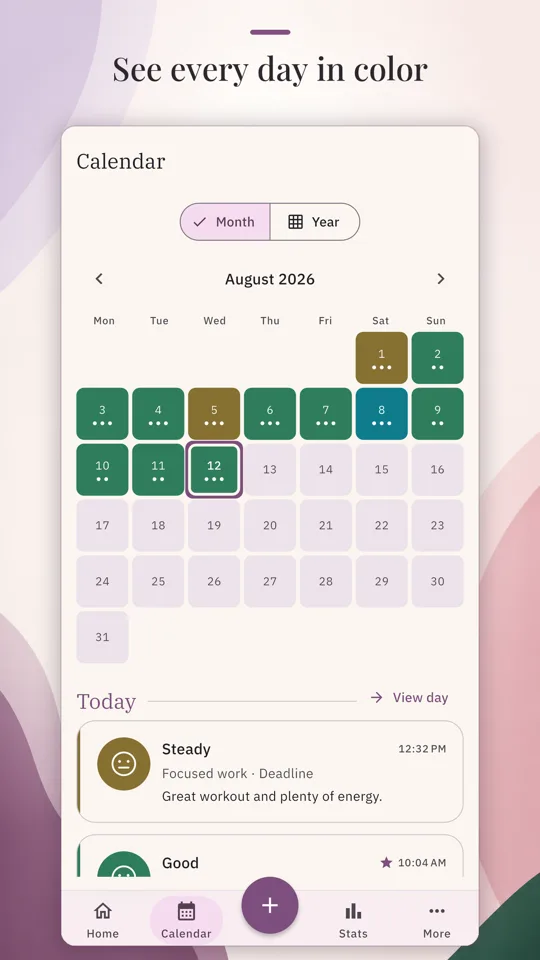
The calendar colors each day of the month by its mood, so a good week and a rough patch both read at a glance, before you open a single entry. Tap a day to see what you logged on it. The Month and Year toggle switches to Year in Pixels: one pixel per day, colored by mood, with the whole year on one screen.
Statistics
Five ways to read your mood
Every screen here is free and stays free, reads over the last 7, 30, or 90 days or over everything you have logged, and is computed on your device.
Mood over time
Your average mood as a line across the range you pick, so a slow lift or a slow slide shows up as a shape instead of a hunch.
Mood distribution
How often each mood appears in the range, so you can see whether Good days are the rule or the exception.
Frequent activities
The activities you log most, counted across the range.
Mood by activity
The average mood of the entries tagged with each activity, compared with your overall average for the range. The screen presents it as an association, not a cause.
Streaks
Your current run of consecutive days with at least one entry, and your best run ever. Streaks are always all-time: they describe the logging habit itself.
Privacy
Tracked on your device, and nowhere else
Everything on this page happens in app-private storage on your phone. Daylum has no account, needs no network connection, and never uploads your journal to a server or syncs it to the cloud. There is no analytics, no ad tracking, and no remote telemetry.
The privacy policy states the full position, including what happens when you buy Daylum Plus and what this website itself loads.